mirror of
https://github.com/PiSugar/PiSugar.git
synced 2026-11-26 09:56:23 -05:00
Updated PiSugar 3 Series (markdown)
 Jdaie
parent
60c1a1f606
commit
fdf6a91cdc
1 changed files with 30 additions and 57 deletions
|
|
@ -78,7 +78,36 @@ User Guide: https://github.com/PiSugar/PiSugar/wiki/PiSugar-Power-Manager-(Softw
|
|||
| Communication interface | 0x57/0x68 address | 0x57/0x68 address |
|
||||
| Size of PCB | 65mmX56mm | 65mmX30mm |
|
||||
|
||||
## Table of I2C
|
||||
## PCB instructions
|
||||
|
||||
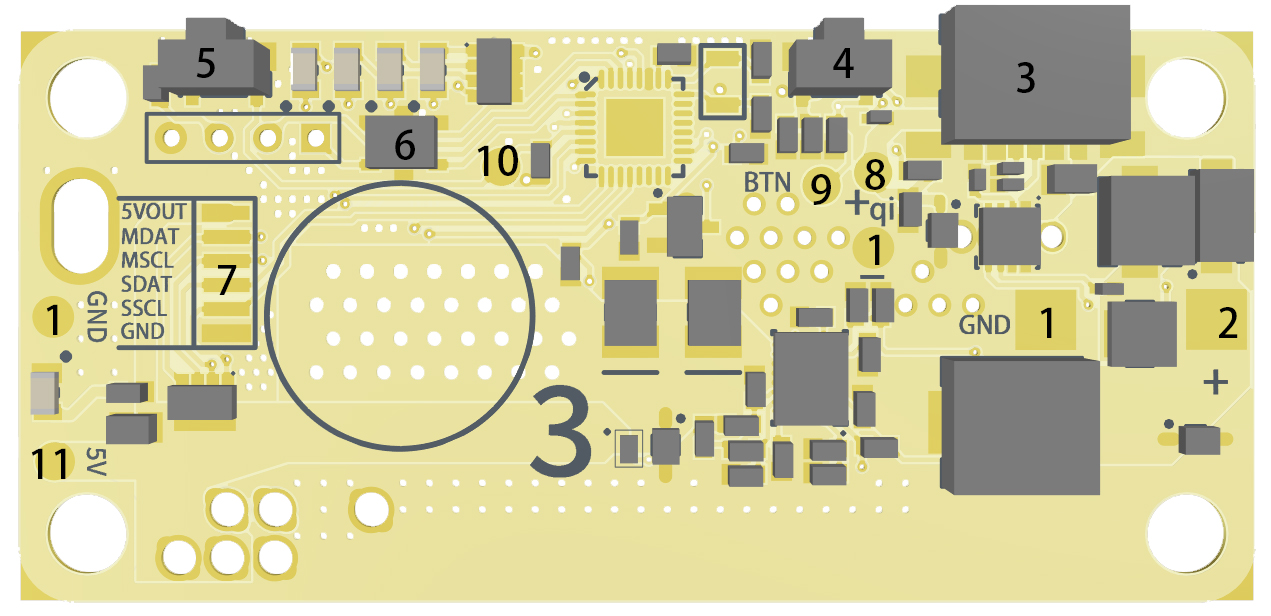
**PiSugar3**
|
||||
|
||||
<p>
|
||||
<img width="500" title="PiSugar3" src="https://cdn.pisugar.com/img/PiSugar3-1200mah.jpg?imageView2/0/w/800">
|
||||
</p>
|
||||
|
||||
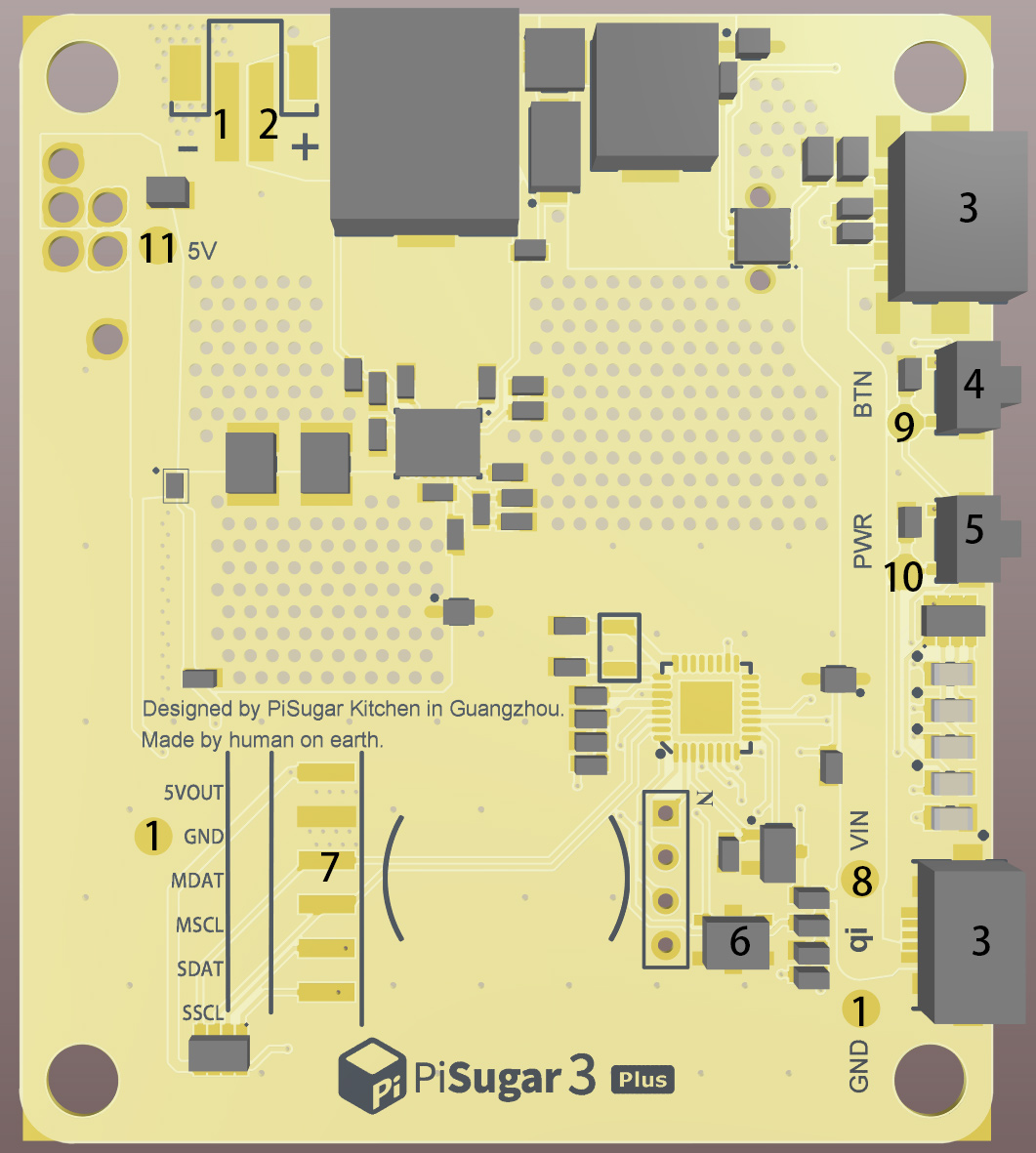
**PiSugar3 Plus**
|
||||
|
||||
<p>
|
||||
<img width="500" title="PiSugar3" src="https://cdn.pisugar.com/img/PiSugar3-5000mah.jpg?imageView2/0/w/800">
|
||||
</p>
|
||||
|
||||
| Position | Name | Description |
|
||||
| :------------------------ | :---------------: | :---------------: |
|
||||
| 1 | GND | PiSugar's GND, 0V, all GNDs are connected, if connected to the Raspberry Pi, also directly to the Raspberry Pi's GND |
|
||||
| 2 | BAT | Battery Positive, 3V-4,2V |
|
||||
| 3 | USB Input | Input voltage 4.5V-5.2V |
|
||||
| 4 | Custom function button | |
|
||||
| 5 | Power button | |
|
||||
| 6 | System reset button | Use when the hardware is in abnormal state, short press will reset PiSugar |
|
||||
| 7 | Extension Interface | 5V Output, GND, MDAT/MSCL: I2C main interface, no function at this time. SDAT/SSCL: I2C slave interface, connected to Pi's I2C interface. |
|
||||
| 8 | 5V Input Pad | Connect to USB interface 5V input |
|
||||
| 9 | Custom Button Pad | Trigger custom button function when connected to BAT(PAD:2) |
|
||||
| 10 | Power Button Pad | Trigger power button function when connected to BAT(PAD:2) |
|
||||
| 11 | 5V Output Pad | Connected to system 5V output, connected to Raspberry Pi 5V |
|
||||
|
||||
|
||||
## I2C Datasheet
|
||||
|
||||
**Register address:**
|
||||
|
||||
|
|
@ -546,59 +575,3 @@ WebUI supports this function.
|
|||
"i2c_addr"= 48,
|
||||
|
||||
**Minimum firmware version: 1.0.6**
|
||||
|
||||
## PCB instructions
|
||||
|
||||
**PiSugar3**
|
||||
|
||||
|
||||
|
||||
**PiSugar3 Plus**
|
||||
|
||||
|
||||
|
||||
1. GND
|
||||
|
||||
PiSugar's GND, 0V, all GNDs are connected, if connected to the Raspberry Pi, also directly to the Raspberry Pi's GND
|
||||
|
||||
1. BAT
|
||||
|
||||
Battery Positive, 3V-4,2V
|
||||
|
||||
1. USB input
|
||||
|
||||
Input voltage 4.5V-5.2V
|
||||
|
||||
1. Custom function button
|
||||
|
||||
1. Pwoer button
|
||||
|
||||
1. System reset button
|
||||
|
||||
Use when system is in abnormal state, short press will reset PiSugar
|
||||
|
||||
1. Extension Interface
|
||||
|
||||
5V Output
|
||||
|
||||
GND
|
||||
|
||||
MDAT/MSCL: I2C main interface, no function at this time
|
||||
|
||||
SDAT/SSCL: I2C slave interface, connected to Raspberry Pi I2C interface
|
||||
|
||||
1. 5V Input Pad
|
||||
|
||||
Connect to USB interface 5V input
|
||||
|
||||
1. Custom Button Pad
|
||||
|
||||
Trigger custom button function when connected to BAT(PAD:2)
|
||||
|
||||
1. Power Button Pad
|
||||
|
||||
Trigger power button function when connected to BAT(PAD:2)
|
||||
|
||||
1. 5V Output Pad
|
||||
|
||||
Connected to system 5V output, connected to Raspberry Pi 5V
|
||||
|
|
|
|||
Loading…
Add table
Add a link
Reference in a new issue