32d8746222
The map's new ATAK tab: adding WROLPi's map to ATAK and iTAK (HTTP and
HTTPS map sources), taking an area offline, what the map shows, the tile
service panel, and clearing kept tiles.  wrolpi-tiles is listed with the
Controller's services.

Co-Authored-By: Claude Opus 5.5 <noreply@anthropic.com>
3.8 KiB
Service Management
The Controller allows you to manage all WROLPi services from a single interface.
Managed Services
The following services are managed by the Controller:
| Service | Port | Description |
|---|---|---|
| wrolpi-controller | 80 | System management (this service) |
| wrolpi-api | 8081 | Backend API server |
| wrolpi-app | 3000 | React frontend application |
| wrolpi-help | 8086 | Documentation server |
| wrolpi-kiwix | 8085 | Offline wiki server (Kiwix) |
| wrolpi-tiles | 8088 | Map tiles for ATAK and iTAK |
| caddy | 80/443 | Web server and reverse proxy |
| smbd / nmbd | 445 | Samba file sharing |
Development services (shown only when running):
- wrolpi-api-dev - API in debug mode
- wrolpi-app-dev - Frontend in development mode
- wrolpi-upgrade - System upgrade process
Service Controls
Starting a Service
Click the Start button next to a stopped service to start it. The status will update once the service is running.

Stopping a Service
Click the Stop button to stop a running service. Use caution when stopping critical services like Caddy.

Restarting a Service
Click the Restart button to stop and start a service. This is useful when a service is misbehaving or after configuration changes.

Enabling/Disabling at Boot
Toggle the boot switch to control whether a service starts automatically when the system boots. This is only available in native mode (systemd).

Viewing Service Logs
Click the Logs button to view recent log output for a service.

Log Options
- Lines - Number of log lines to retrieve (100-5000)
- Download - Save logs as a text file for offline analysis

Auto-Scroll
When viewing logs, scroll to the bottom to enable auto-refresh. New log entries will appear automatically. Scroll up to pause auto-refresh.
Restart All Services
The "Restart All Services" button restarts all WROLPi services in sequence. The Controller restarts itself last to ensure the operation completes.
This is useful after:
- System configuration changes
- Recovering from errors
- Applying updates

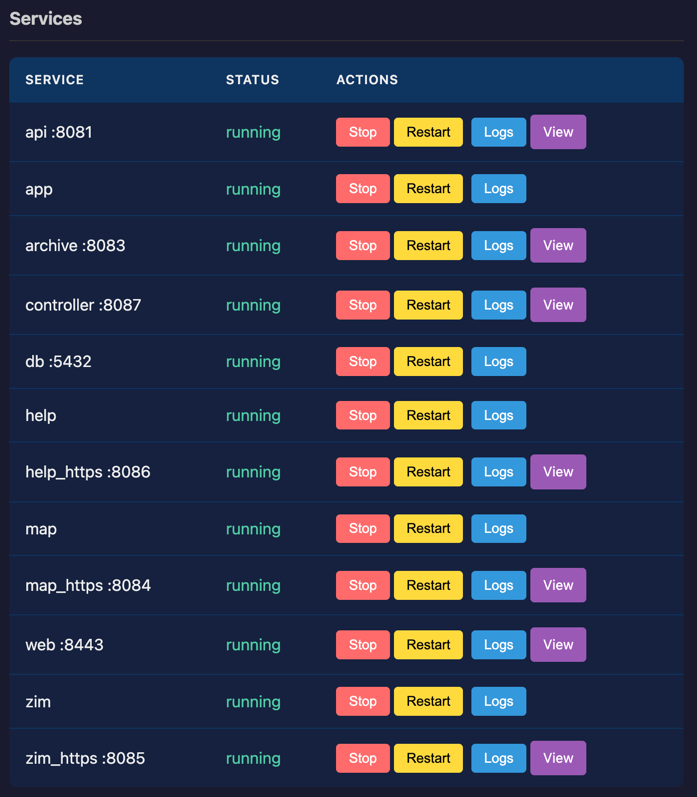
Docker Mode
In Docker deployments, the Controller manages Docker containers instead of systemd services:
- Container start/stop/restart is available
- Boot toggle is not available (managed by Docker Compose)
- Container names differ from native systemd service names
Docker Container Architecture
Caddy handles HTTPS termination and reverse proxying for all services in a single web container:
| Container | Port | Description |
|---|---|---|
web |
8443 | Caddy reverse proxy (HTTPS) |
api |
8081 | Backend API |
app |
- | React frontend |
controller |
8080 | Controller service (HTTP) |
help |
8086 | Help documentation (via Caddy) |
zim |
8085 | Kiwix wiki server (via Caddy) |
samba |
445 | Samba file sharing |
The API database is SQLite at /media/wrolpi/config/wrolpi.db (no database container).
The following screenshot is from a healthy WROLPi running in Docker containers